Welcome to Mee Bhoomi AP, the official online platform revolutionizing land record management in Andhra Pradesh (ఆంధ్రప్రదేశ్). Launched by the Andhra Pradesh Revenue Department, this user-friendly portal at meebhoomi.ap.gov.in empowers citizens to access critical land-related information effortlessly. Whether you’re a landowner, farmer, or property buyer, Mee Bhoomi (మీ భూమి) provides seamless access to records like 1B Adangal, Village Maps, E-Passbooks, and more, all from the comfort of your home.
Disclaimer:
meebhoomiap.com.in is a privately operated informational website.
We are not affiliated with the Government of Andhra Pradesh or any official department.
For official services, visit the Andhra Pradesh Government website.
Why Choose Mee Bhoomi AP ?
The Mee Bhoomi portal, translating to "Your Land" in Telugu (తెలుగు), is designed to bring transparency, efficiency, and accessibility to land record services. Here’s why it’s a game-changer:
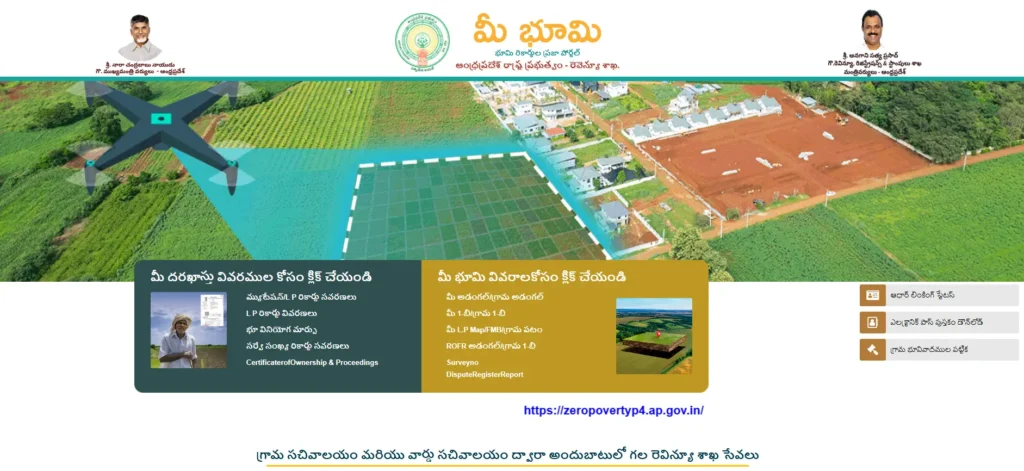
credits: https://meebhoomi.ap.gov.in/
- Instant Access: Retrieve Adangal, 1B records (1-బి రికార్డ్స్), Field Measurement Books (FMB), and E-Passbooks anytime, anywhere, without visiting government offices.
- Transparency: Digitized records reduce fraud and ensure accurate, tamper-proof data.
- User-Friendly Interface: Available in Telugu and English, the portal is optimized for both desktop and mobile users.
- Comprehensive Services: From checking ownership details to linking Aadhaar with land records, Mee Bhoomi AP covers all your land-related needs.
Key Services on Mee Bhoomi AP
The Mee Bhoomi portal offers a wide range of services to simplify land management:
- Mee Bhoomi Adangal: Access detailed land records, including ownership, soil type, crop details, irrigation sources, and land use. Essential for property transactions and agricultural planning.
- 1B Adangal AP: Verify ownership details, survey numbers (మీ భూమి సర్వే నెంబర్), and land extent with the Record of Rights (ROR-1B) document, crucial for legal proceedings and loans.
- Village Maps & FMB: Visualize land parcels with detailed village maps and precise boundary measurements. Access మీ భూమి సర్వే నెంబర్ మ్యాప్ to view specific survey number-based land layouts.
- E-Passbook: Download a digital passbook consolidating all your land details for easy reference.
- Aadhaar Linking: Secure your records by linking them with your Aadhaar number.
- Land Dispute Status: Check the status of land-related disputes and revenue court cases.
- Mutation & Land Conversion: Update ownership records or apply for converting agricultural land to non-agricultural use.
How to Access Land Records on Mee Bhoomi AP
Accessing your land records on Mee Bhoomi AP is simple and quick. Follow these steps:
Step 1: Visit the Official Portal
Go to meebhoomi.ap.gov.in and select your desired service, such as Adangal (మీ భూమి అడంగల్), 1B, or Village Map.
Step 2: Enter Land Details
Choose your District, Mandal, and Village from the dropdown menus. Depending on the service, enter details like:
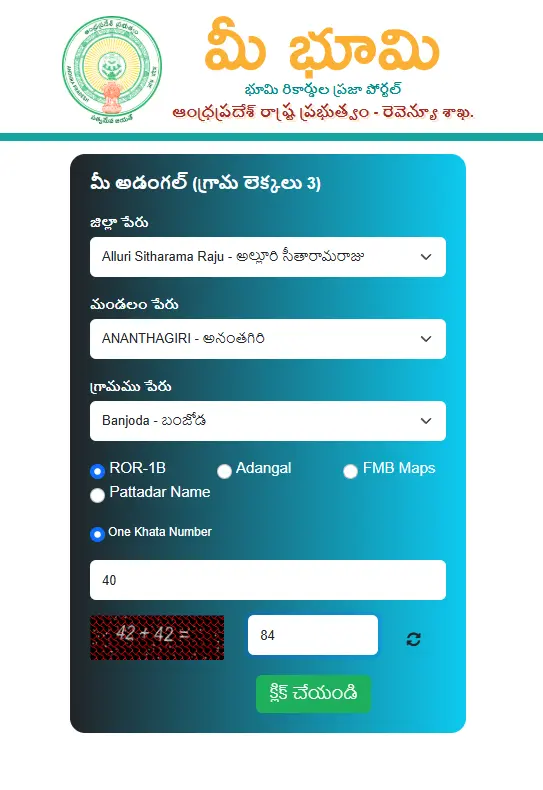
- Survey Number or Khata Number for Adangal or 1B, or మీ భూమి సర్వే నెంబర్ మ్యాప్.
- Plot ID for ROFR Adangal.
Step 3: Submit and View
Complete the CAPTCHA, click Submit, and your records will appear. You can view, download, or print documents like Mee Bhoomi 1B (మీ భూమి 1బి అడంగల్), Adangal, ROR1b Report or Village Maps for your records.
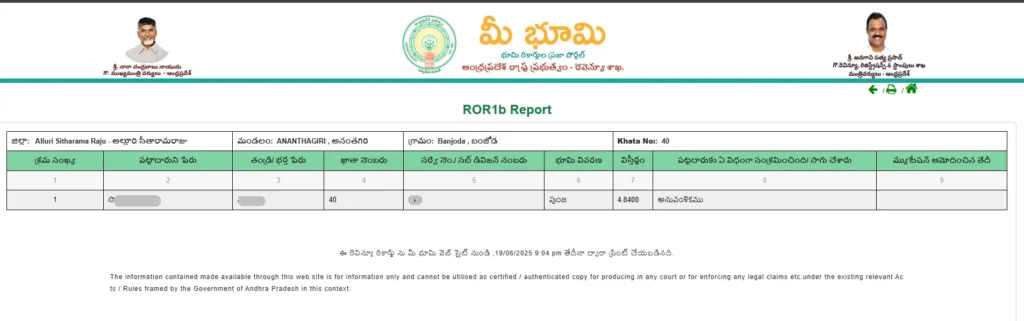
Step 4: Additional Features
- E-Passbook Download: Use your registered mobile number to receive an OTP and download your digital passbook.
- Aadhaar Linking: Enhance security by linking your Aadhaar to your land records.
- Grievance Filing: File complaints or check dispute statuses directly on the portal.
Benefits of Using Mee Bhoomi AP
The Mee Bhoomi portal has transformed land governance in Andhra Pradesh by offering:
- Time and Cost Savings: Access records instantly without the hassle of government office visits.
- Agricultural Support: Adangal and E-Passbooks help farmers secure loans and subsidies.
- Digital Integration: Real-time updates through integration with the Webland system.
- Mobile Accessibility: Use the Mee Bhoomi app (available on Google Play Store and App Store) for on-the-go access.
How to Link Aadhaar with Mee Bhoomi Records
Linking your Aadhaar number enhances the security of your land records. Here’s how:
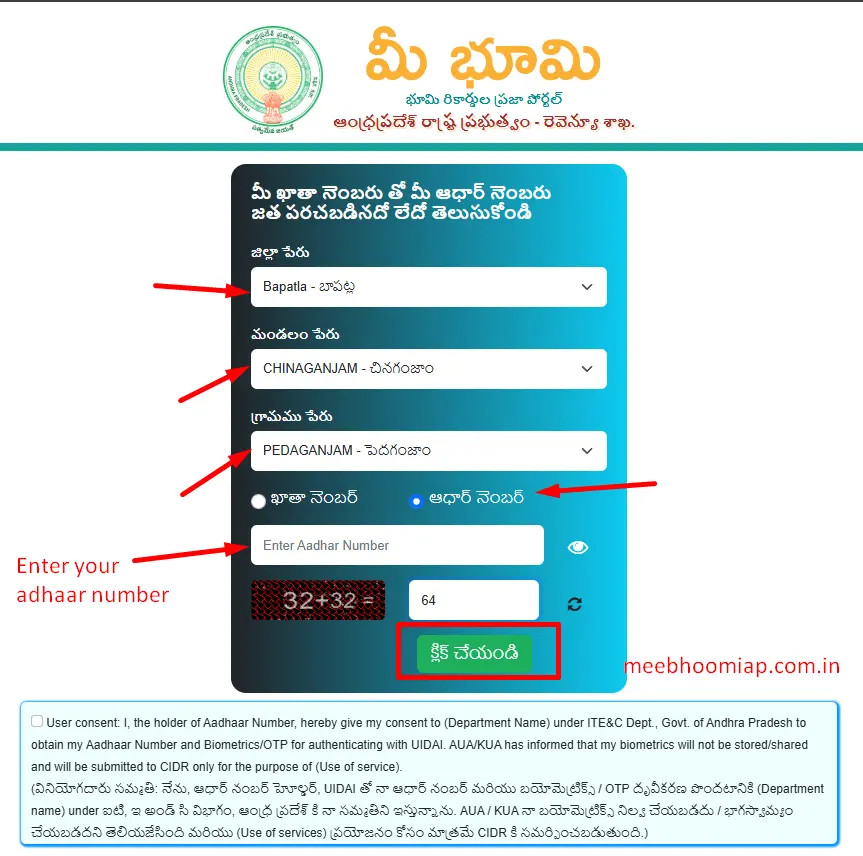
- Visit meebhoomi.ap.gov.in and select Aadhaar Linking Status.
- Enter your District, Mandal, Village, Account Number, and Aadhaar Number.
- Complete the CAPTCHA and submit to verify or link your Aadhaar.
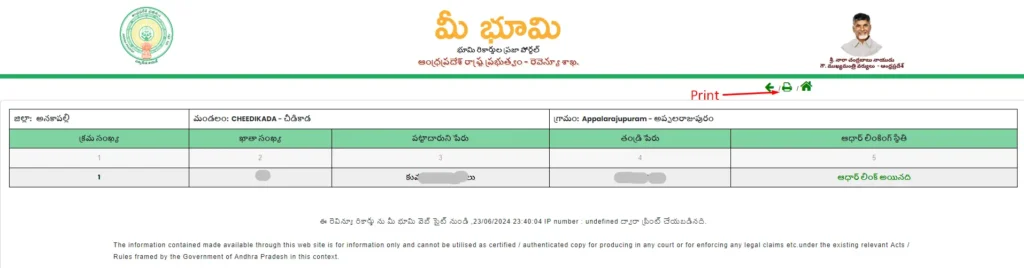
How to Access Survey Number Maps (మీ భూమి సర్వే నెంబర్ మ్యాప్)
To view detailed land layouts:
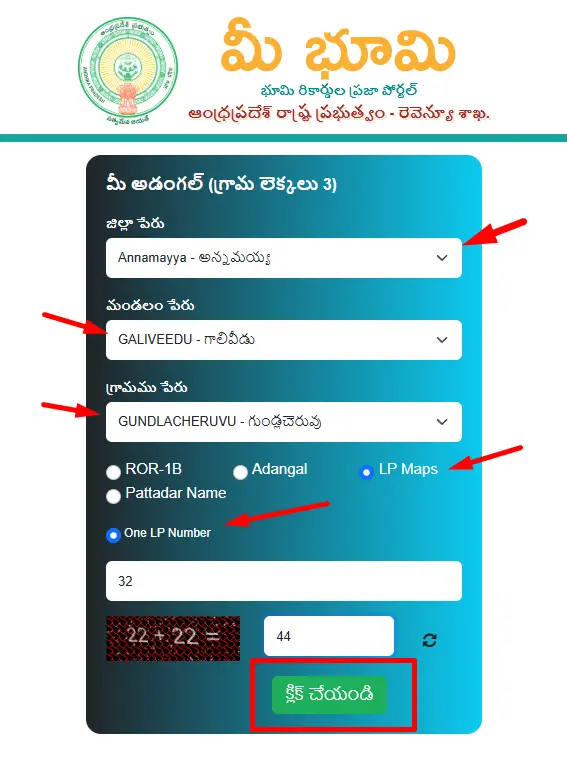
- Visit meebhoomi.ap.gov.in and select Village Map.
- Enter your District, Mandal, Village, and Select ROR-1B or Adangal or LP Maps or Pattadar Name.
- For example, if you select LP Maps, you need to Enter One LP number to get details.
- Submit to view the మీ భూమి సర్వే నెంబర్ మ్యాప్, which displays precise land boundaries.
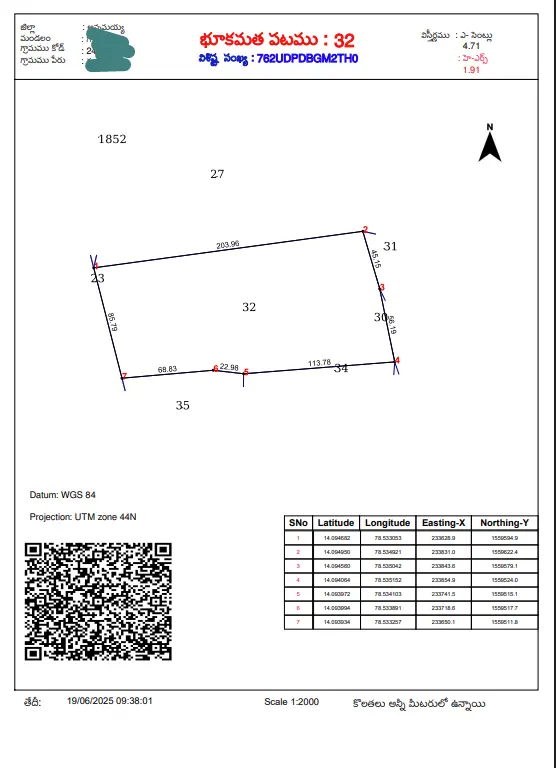
How to Check 1B Adangal / Mee Bhoomi 1B Online
To view or download your 1B Adangal through the MeeBhoomi portal, follow these simple steps:
Step 1: Visit the MeeBhoomi Website
Go to the official MeeBhoomi portal and click on “మీ 1-బి / గ్రామ 1-బి (Mee 1B / Grama 1B)” from the homepage menu.
Step 2: Select Location Details
On the next page, you’ll be asked to enter your District, Mandal, and Village details.
Then choose the ROR-1B option and select either “One Survey Number” or “Entire Village” based on your requirement.
For example, if you want details for a specific plot, choose “One Survey Number”, then enter your Survey Number, fill in the Captcha Code, and click on the “క్లిక్ చేయండి (Click)” button.
Step 3: View and Print the 1B Adangal
Your 1B Adangal report will be displayed on the screen.
You can verify details like the landowner’s name, Khata number, survey number, land type, extent, cultivation information, and mutation status.
To save or print the report, simply click on the “Print” option provided on the page.
This process helps landowners easily access and verify their MeeBhoomi 1B Adangal records online without visiting the revenue office.
How to Check LP Map / FMB / Village Map Online
You can easily view your LP Map, FMB (Field Measurement Book), or Village Map using the MeeBhoomi portal by following the steps below:
Step 1: Visit the MeeBhoomi Website
Go to the official MeeBhoomi website - meebhoomi.ap.gov.in.
From the homepage, click on “మీ భూమి వివరాలకోసం క్లిక్ చేయండి” and then select “మీ L.P Map / FMB / గ్రామ పటం”.
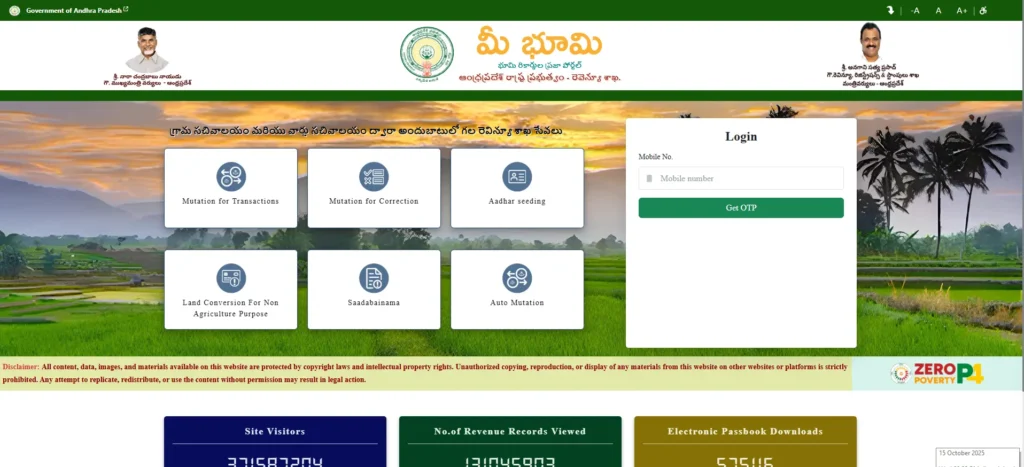
Step 2: Enter Location Details
Choose your District, Mandal, and Village from the drop-down menus.
Then, select the FMB Maps option.
You’ll have two choices - “One Survey Number” or “Village Map.”
For this example, select Village Map, complete the Captcha, and click Submit.
Step 3: View and Download Village Map
Your Village Map will appear on the screen in PDF format, displaying all land parcels and their boundaries.
You can download or print the map for your records.
This helps landowners clearly view the layout and size of their property within the village boundaries.
How to Check ROFR Adangal / Village 1B Online
To access ROFR Adangal or Village 1B details through the MeeBhoomi portal, follow the steps below:
Step 1: Open MeeBhoomi Homepage
Go to meebhoomi.ap.gov.in and click on “మీ భూమి వివరాలకోసం క్లిక్ చేయండి” followed by “ROFR అడంగల్ / గ్రామ 1-బి”.
Step 2: Provide Required Information
Select your District, Mandal, and Village.
Then, choose the Adangal option.
You’ll get two choices - “Plot ID” or “Entire Village.”
Select Plot ID, enter your Plot ID number, fill in the Captcha, and click Submit.
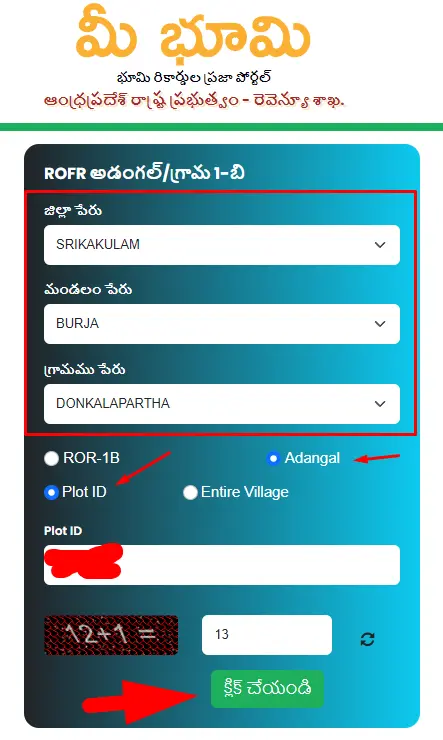
Step 3: View ROFR Adangal Report
Once submitted, your ROFR Adangal or Village Map will be displayed on the screen.
You can check complete details such as land area, survey boundaries, ownership, and cultivation information.
The report can be viewed, saved, or printed for future reference.
This online service helps you conveniently access your ROFR Adangal and FMB/Village Map without visiting government offices.
Contact Mee Bhoomi Support
For assistance, reach out to the Mee Bhoomi team:
- Toll-Free Number: 14400
- Email: [email protected]
Mee Bhoomi AP is your one-stop solution for managing land records in Andhra Pradesh. Whether you need to check Mee Bhoomi Adangal, download 1B Adangal AP, or access Village Maps, this portal ensures transparency and convenience. Visit meebhoomi.ap.gov.in today to explore your land details and take control of your property management with ease. Your land, your rights - made simple with Mee Bhoomi!
Frequently Asked Questions (FAQs) About Mee Bhoomi AP
Mee Bhoomi AP is an online portal (meebhoomi.ap.gov.in) launched by the Andhra Pradesh Revenue Department to access land records like 1B Adangal, Adangal, Village Maps, and E-Passbooks. It offers transparency and convenience for landowners and farmers.
To check 1B Adangal AP:
Visit meebhoomi.ap.gov.in.
Select మీ 1-బి/గ్రామ 1-బి (Mee 1B/Grama 1B).
Enter your District, Mandal, Village, and Survey Number or Khata Number.
Complete the CAPTCHA and submit to view and download your 1B Adangal report.
To access a Village Map or మీ భూమి సర్వే నెంబర్ మ్యాప్:
Go to meebhoomi.ap.gov.in and select Village Map.
Choose your District, Mandal, and Village.
Enter the Survey Number for a specific map or select the entire village.
Submit to view the map in PDF format.
Yes, you can download an E-Passbook:
Visit the Mee Bhoomi portal and select the E-Passbook option.
Enter your registered mobile number to receive an OTP.
Verify the OTP and download your digital passbook with all land details.
To link your Aadhaar:
Go to meebhoomi.ap.gov.in and select Aadhaar Linking Status.
Enter your District, Mandal, Village, Account Number, and Aadhaar Number.
Complete the CAPTCHA and submit to link or verify your Aadhaar.
If you encounter issues, contact Mee Bhoomi support:
Toll-Free Number: 14400
Email: [email protected]
You can also file a grievance directly on the portal.
Yes, the Mee Bhoomi app is available on the Google Play Store and App Store, allowing you to access Adangal, 1B, and Village Maps on the go.